
The 3D virtual tour industry continues to grow as more industries discover the value of immersive spatial documentation. If you are considering starting a virtual tour business, 2026 is an interesting time to enter the market — the technology is mature, demand is established, and the competitive landscape has shifted enough to create real opportunities.
This guide covers the practical steps to start a virtual tour business, from equipment selection and pricing strategy to marketing and scaling.
Is the Virtual Tour Market Still Growing?
Before investing in equipment and training, the first question is whether demand exists. The answer depends on your target market:
Strong Demand Markets
- Commercial real estate — office buildings, retail spaces, industrial properties
- Hospitality — hotels, resorts, event venues, vacation rentals
- Construction documentation — AEC firms need regular progress documentation
- Multi-family housing — apartment complexes and property management companies
- Insurance — pre-loss documentation and claims processing
Commoditized Markets
- Residential real estate — this market has become price-competitive as smartphone capture and low-cost providers have entered. Margins are thin unless you target luxury listings ($1M+) or combine with photography/video services.
Emerging Markets
- Manufacturing and industrial — facility documentation and digital twins
- Museums and cultural heritage — virtual access to collections and sites
- Education — campus tours and enrollment marketing
- Healthcare — facility navigation and virtual orientation
The key insight is that the residential real estate market (where most people think of virtual tours first) is the most competitive and lowest-margin segment. The real opportunity in 2026 is in commercial, hospitality, and AEC applications.
Step 1: Choose Your Equipment
The Matterport Path
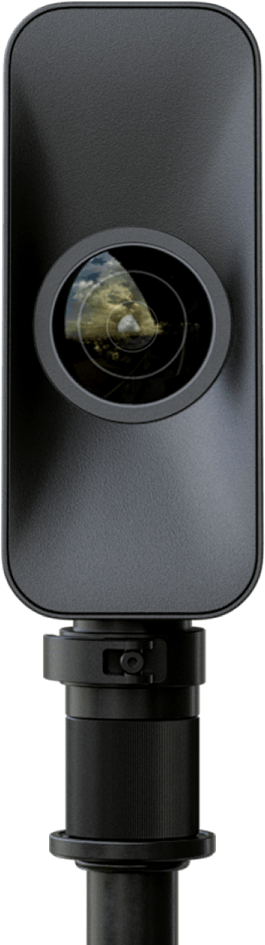
The most common starting point. Matterport offers the strongest ecosystem and brand recognition:
- Matterport Pro3 — the flagship camera with LiDAR depth to 100m, a 134.2 MP HDR panorama, and indoor/outdoor capability. This is the professional standard.
- Matterport Pro2 — older model, lower cost, indoor-only. Adequate for basic residential but showing its age.
- Smartphone capture — lowest entry point but lowest quality. Not recommended for professional service.
Minimum Matterport investment: Camera + professional tripod + iPad + carrying case + Professional subscription ($69/month).
Alternative Platforms
- iGUIDE (PLANIX camera) — strong for floor-plan-focused work. Pay-per-tour pricing eliminates monthly subscription overhead. Good for appraisal and insurance work.
- Ricoh Theta Z1 — affordable 360 camera compatible with Matterport and other platforms. Good for testing the market before committing to a Pro3.
- Insta360 — consumer/prosumer 360 cameras that work with various hosting platforms.
Our Recommendation for New Businesses
Start with a Matterport Pro3 on the Professional plan. The brand recognition alone makes sales easier — when you tell prospects you use Matterport, they know what to expect. You can always add iGUIDE or other platforms later as your client needs diversify.
Step 2: Set Your Pricing Strategy

Pricing is where most new virtual tour businesses make their first critical mistake — pricing too low to win clients and then being unable to raise rates later.
Pricing Framework
| Service Tier | Your Price | Your Margin Target |
|---|---|---|
| Residential (under 3,000 sqft) | $350-$750 | 60-70% |
| Commercial (offices, retail) | $750-$2,000 | 65-75% |
| Large Venue (hotel, convention) | $2,000-$5,000+ | 70-80% |
What to Include in Base Price
- On-site scanning (travel within your metro area)
- Processing and quality control
- Embed code and shareable link
- Basic post-processing (starting position, highlight reel)
What to Charge Extra For
- Schematic floor plans: +$50
- MatterPak (3D assets): +$100
- E57 point cloud export: +$150
- Video flythrough: +$150/minute
- Travel beyond your metro area: mileage + time
- Rush delivery (same-day or next-day): 25-50% premium
What NOT to Include
Hosting. This is the most important pricing decision. Hosting costs $20/month on Matterport Cloud. Either charge clients $20/month separately, or have them create their own Matterport account and transfer the tour. Including hosting in your base price creates an ongoing liability that compounds with every client.
Pricing Mistakes to Avoid
- Racing to the bottom. There will always be someone cheaper. Compete on quality, reliability, and service instead.
- Pricing by square foot. This undersells large spaces. Price by tier, with custom quotes for large projects.
- Including hosting forever. This is unsustainable. Establish clear hosting terms from your first client.
- Not charging for travel. Your time driving to and from locations has value. Set a radius for included travel and charge beyond it.
Step 3: Build Your Skills
Essential Skills to Develop
Scanning Technique:
- Optimal scan point placement (coverage without redundancy)
- Lighting management (natural vs artificial, mixed conditions)
- Dealing with challenging spaces (mirrors, glass, narrow hallways, stairs)
- Outdoor scanning (sun angle, wind, moving objects)
Post-Processing:
- Setting optimal starting positions and navigation paths
- Adding Mattertags and information hotspots
- Creating highlight reels for social media
- Floor plan review and correction
Client Communication:
- Pre-scan preparation guidance (what to clean, move, stage)
- Setting expectations for delivery timeline and output quality
- Walking clients through tour features and embedding options
- Handling revision requests professionally
Training Resources
- Matterport Academy — free official training modules covering camera operation, scanning best practices, and platform features
- YouTube tutorials — search for specific scanning scenarios (how to scan a staircase, scanning near mirrors, etc.)
- Matterport community forums — active community of professionals sharing tips and troubleshooting
- Practice scans — scan your own home, office, and friends’ properties before charging clients
The Practice Phase
Plan for 10-15 practice scans before taking on paid work. This is non-negotiable. Your first scans will have problems — alignment issues, coverage gaps, lighting inconsistencies. Better to make these mistakes on practice scans than on a client’s million-dollar listing.
Step 4: Set Up Your Business
Legal and Administrative
- Business entity: LLC is recommended for liability protection
- Insurance: General liability insurance and equipment insurance are essential. Some commercial clients require proof of insurance before granting building access.
- Contracts: Create a standard service agreement covering scope, pricing, delivery timeline, hosting terms, usage rights, and liability
- Invoicing: Set up professional invoicing with clear payment terms (50% deposit to schedule, balance before tour delivery)
Technology Setup
- Website: A professional website with examples of your work is essential. Include embedded Matterport tours as portfolio pieces.
- Scheduling: Use a booking system that allows clients to self-schedule scan appointments
- CRM: Track leads, clients, and project history. Even a simple spreadsheet works initially.
- Cloud storage: Back up all scan data. Hard drives fail.
Step 5: Find Your First Clients
Target Markets (Start Here)
Real Estate Agents (easiest entry point):
- Attend local real estate association meetings
- Offer one free or discounted scan to a top-producing agent in exchange for a testimonial
- Focus on agents who sell $500K+ listings — they have budget and understand the value
Property Managers (recurring revenue):
- Apartment communities need tours for every unit type and common areas
- Property management companies offer volume contracts
- Once you scan one property in a portfolio, you are positioned to scan the rest
Hotels and Hospitality (highest per-project revenue):
- Contact hospitality marketing directors directly
- Boutique hotels and resorts are more accessible than major chains
- Event venues (wedding venues, conference centers) are excellent early clients
Marketing Strategies

-
Portfolio-first approach. Build 5-10 excellent sample tours before actively marketing. Embed them on your website and share them on social media.
-
Google Business Profile. Optimize your GBP listing. Add your own Google Street View integration as a demonstration of your capabilities.
-
Local networking. Attend real estate, hospitality, and construction industry events. Bring a tablet to demo tours in person.
-
Referral partnerships. Partner with real estate photographers, stagers, and marketing agencies who do not offer virtual tours.
-
Content marketing. Write about virtual tour ROI, best practices, and industry trends. Position yourself as a knowledgeable professional, not just a camera operator.
Step 6: Scale the Business

Adding Revenue Streams
Once your virtual tour business is established, natural expansion paths include:
- 3D laser scanning for AEC — higher-value projects using equipment like the Trimble X12. This moves you from marketing tours to professional documentation.
- Drone photography and video — complementary service for real estate and commercial clients
- Floor plan services — adding iGUIDE or manual measurement to your toolkit
- Google Street View publishing — publishing virtual tours to Google Maps for local businesses
- Subscription packages — monthly retainers for property managers and hotels who need regular updates
Hiring Your First Technician
When you are consistently booked and turning away work, it is time to hire:
- Train technicians on your exact workflow and quality standards
- Start with part-time contract operators before committing to full-time employees
- Implement QC checklists so every scan meets your standard regardless of who operates the camera
- Invest in a second camera setup so you can run concurrent scans
Partnership vs Independence
You can also grow by partnering with established firms:
- Real estate brokerages — become their preferred virtual tour provider
- Established scanning companies — companies like THE FUTURE 3D offer partnership opportunities in markets where they need local scanning capability
- Marketing agencies — become the virtual tour arm of a full-service marketing firm
Common Mistakes New Virtual Tour Businesses Make
-
Starting with residential RE only. This is the most competitive and lowest-margin market. Diversify into commercial and hospitality early.
-
Underpricing to win clients. You will attract price-sensitive clients who are the hardest to retain and least likely to refer premium clients.
-
Neglecting the business side. Scanning is the fun part. Invoicing, contracts, insurance, and taxes are not — but they are what separate a hobby from a business.
-
Not specializing. “I scan everything” is not a positioning strategy. “I specialize in hotel and resort virtual tours” is much more compelling to a hotel marketing director.
-
Ignoring hosting economics. If you absorb hosting costs for every client, your monthly expenses grow indefinitely. Establish hosting terms from day one.
Key Takeaways
-
The opportunity is real but not in residential. Commercial, hospitality, AEC, and multi-family housing are where the margins and growth potential exist.
-
Start with Matterport Pro3. Brand recognition and ecosystem make it the easiest platform for new businesses to sell.
-
Price for value, not volume. Residential tours start at $350 minimum. Commercial at $750+. Never race to the bottom.
-
Practice before you charge. Budget 10-15 free scans to build skills and portfolio before taking paid clients.
-
Hosting is a business model decision. Do not include it in your base price. Charge separately or have clients manage their own Matterport account.
-
Plan for expansion. Virtual tours are often the entry point for a broader 3D documentation business that can include laser scanning, drone services, and AEC work.
Considering a virtual tour business and want to learn from a team with 500+ completed projects? Contact THE FUTURE 3D to discuss partnership opportunities in your market, or explore our Matterport pricing guide to understand the full cost structure.
Ready to Start Your Project?
Get a free quote and consultation from our 3D scanning experts.
Get Your Free Quote