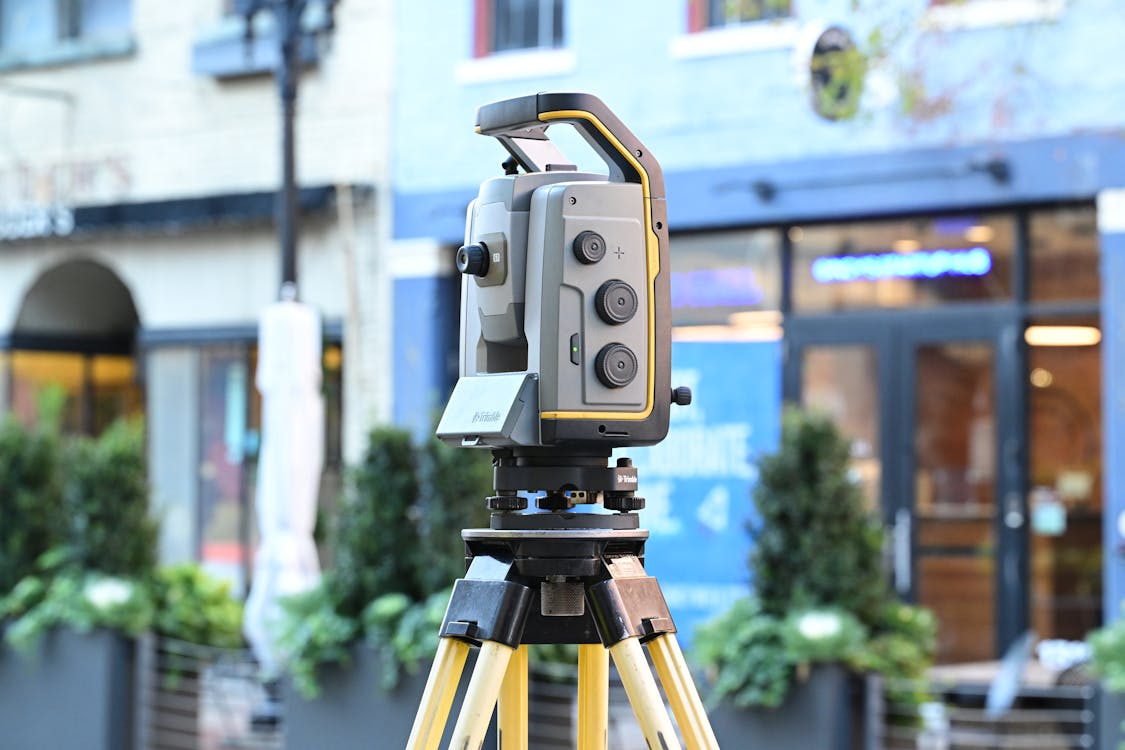
The 3D scanning industry has traditionally relied on one instrument type: the tripod-mounted terrestrial laser scanner. You set it up, it spins, captures a 360-degree point cloud, and you move it to the next position. This approach delivers exceptional accuracy — 1-3mm — but it is methodical and time-intensive. A large building can take days to scan.
Mobile scanning represents a fundamentally different approach. Instead of placing a scanner at fixed positions, the operator walks through a space carrying or wearing a scanner that captures continuously. What takes a terrestrial scanner a full day might take a mobile scanner two hours.
The question is not which technology is better. Both have clear strengths and clear limitations. The question is which technology is right for your specific project — or whether the answer is both.
How Each Technology Works
Terrestrial Laser Scanning
A terrestrial laser scanner is placed on a tripod at a fixed position. It rotates 360 degrees, emitting millions of laser pulses per second. Each pulse travels to a surface, reflects back, and the scanner calculates the precise distance and angle. The result is a dense point cloud — millions of 3D coordinates — of everything visible from that position.
The scanner is then moved to the next position, and the process repeats. Each position takes 2-5 minutes of capture time. Positions are spaced 5-15 meters apart (closer in complex spaces, farther in open areas). Individual scan positions are later registered (aligned) into a unified point cloud during processing.
Key characteristics:
- Accuracy: 1-3mm at typical ranges
- Capture speed: 2-5 minutes per position, 30-80+ positions per floor
- Range: Up to 130 meters per position
- Point density: Extremely high — millions of points per scan position
- Processing: Each position must be registered; 2-8 hours post-processing per project
Mobile / SLAM Scanning
Mobile scanners use a technology called SLAM (Simultaneous Localization and Mapping). The scanner contains a laser scanner (often a 2D profiling scanner that rotates continuously), cameras, and an inertial measurement unit (IMU). As the operator walks through a space, the system continuously captures point cloud data while simultaneously tracking its own position and orientation.

The result is a continuous point cloud captured along the walk path, rather than discrete point clouds from fixed positions. A floor that requires 50 terrestrial scan positions might take one continuous walk of 15-30 minutes with a mobile scanner.
Key characteristics:
- Accuracy: 5-15mm (varies by device, environment, and walk path)
- Capture speed: Walking pace — 10,000-30,000 sqft per hour
- Range: Varies by device; typically 30-100 meters
- Point density: Lower than terrestrial; sufficient for most as-built applications
- Processing: Largely automated; 1-3 hours for most projects
The Core Tradeoff: Speed vs. Accuracy
The fundamental tradeoff is straightforward: mobile scanning is 5-10x faster in the field, and terrestrial scanning is 3-10x more accurate.
Accuracy Comparison
| Metric | Terrestrial | Mobile SLAM |
|---|---|---|
| Absolute accuracy | 1-3mm | 5-15mm |
| Relative accuracy (within a scan) | Sub-millimeter | 3-8mm |
| Drift over distance | None (fixed positions) | Accumulates with walk distance |
| Performance in featureless corridors | Excellent | Degrades (limited SLAM features) |
| Performance in large open spaces | Excellent (long range) | Degrades (limited SLAM features) |
| Performance in complex interiors | Excellent | Excellent (many features for SLAM) |
The accuracy gap narrows in feature-rich environments (complex interiors with furniture, equipment, and architectural detail) and widens in featureless environments (long corridors, open parking garages, empty warehouses).
Speed Comparison
| Project Size | Terrestrial Time | Mobile Time | Speed Factor |
|---|---|---|---|
| 5,000 sqft office | 2-3 hours | 20-30 minutes | 5-6x |
| 20,000 sqft floor | 6-8 hours | 45-90 minutes | 5-8x |
| 100,000 sqft building (multi-floor) | 3-5 days | 4-8 hours | 6-10x |
| 500,000 sqft campus | 10-15 days | 2-3 days | 4-5x |
These are field capture times only. Processing time is also faster for mobile data, though the advantage is smaller (2-3x faster processing for mobile vs. terrestrial).
When to Use Terrestrial Scanning

Terrestrial scanning is the right choice when accuracy is the primary requirement or when the project demands the highest geometric precision.
Construction Verification and QA/QC
When the point cloud will be compared against design models to check construction tolerances, accuracy of 1-3mm is essential. Structural deviations, slab flatness, curtain wall alignment, and MEP coordination all require measurement precision that mobile scanning cannot reliably deliver.
Scan-to-BIM at LOD 300+
BIM modeling at LOD 300 and above requires precise geometry for element identification and sizing. A 2mm error in a scan translates to correct element identification. A 10mm error can mean a modeler identifies a 6” pipe as an 8” pipe, or positions a wall 1/2 inch off its actual location. For coordination-grade BIM, terrestrial data is the standard.
Small to Medium Projects (Under 30,000 sqft)
For projects under about 30,000 sqft, the speed advantage of mobile scanning is less dramatic (saving hours rather than days), while the accuracy advantage of terrestrial scanning is always present. The cost difference on small projects is also smaller, making terrestrial the default for most firms.
Industrial and Mechanical Documentation
Dense MEP environments, mechanical rooms, and industrial facilities with complex piping require the highest point density and accuracy to capture small-diameter components. Terrestrial scanners provide significantly better results in these environments.
Legal and Regulatory Documentation
When scan data may be used for legal proceedings, insurance claims, or regulatory compliance, the higher accuracy and documented precision of terrestrial scanning provide stronger evidentiary value.
When to Use Mobile Scanning
Mobile scanning excels when speed, coverage, and cost-efficiency matter more than millimeter-level accuracy.
Large-Area As-Built Documentation
For facility management, space planning, and general as-built documentation of large buildings or campuses, mobile scanning delivers sufficient accuracy (5-15mm) at a fraction of the cost and time. A 200,000 sqft hospital that would take a week with terrestrial scanning can be captured in a day with mobile.
Occupied Buildings with Minimal Disruption
Mobile scanning is significantly less disruptive than terrestrial scanning. The operator walks through at normal pace with no need to set up tripods, mark scan positions, or ask occupants to clear areas. For occupied offices, hospitals, schools, and retail environments where minimizing disruption is critical, mobile scanning is the better choice.
Rapid Condition Assessment
When the goal is a quick spatial inventory — documenting room sizes, ceiling heights, door locations, and general layout — rather than precise geometry, mobile scanning provides enough detail at a fraction of the time and cost.

High-Volume Repetitive Documentation
Projects involving hundreds of similar spaces (hotel rooms, apartment units, office suites) benefit enormously from mobile scanning’s speed. A hotel with 200 rooms that would take weeks with terrestrial scanning can be captured in 2-3 days with mobile.
Preliminary Design Support
When architects and engineers need existing-condition data to inform early design concepts — before the project reaches the precision-critical design development phase — mobile scan data provides sufficient information for schematic design at lower cost.
The Hybrid Approach: Best of Both Worlds
Increasingly, sophisticated scanning firms use both technologies on the same project, deploying each where it adds the most value.
Common Hybrid Strategies
Mobile for coverage, terrestrial for critical areas:
- Mobile scan the entire building for general as-built documentation
- Terrestrial scan mechanical rooms, MEP corridors, and areas requiring high-precision BIM modeling
- Register both datasets into a single coordinate system
Mobile for speed, terrestrial for accuracy verification:
- Mobile scan the entire project quickly
- Terrestrial scan a representative sample of areas
- Use terrestrial data to validate and correct mobile data accuracy
Phased approach by project need:
- Phase 1 (schematic design): Mobile scan for rapid existing-condition data
- Phase 2 (design development): Terrestrial scan of areas where precise geometry is needed for coordination
Cost-Effectiveness of Hybrid
| Approach | Field Cost | Accuracy | Best For |
|---|---|---|---|
| Terrestrial only | Highest | 1-3mm everywhere | Precision-critical projects |
| Mobile only | Lowest | 5-15mm everywhere | Large-area documentation |
| Hybrid | 40-60% of terrestrial-only | 1-3mm where it matters, 5-15mm elsewhere | Most real-world projects |
The hybrid approach typically costs 40-60% of a full terrestrial scan while achieving terrestrial-grade accuracy in the areas that matter most. For many projects, this is the optimal balance.
Equipment Comparison: NavVis VLX3 vs. Trimble X12
To make the comparison concrete, here is how two representative instruments from each category compare:
NavVis VLX3 (Mobile SLAM Scanner)
- Form factor: Wearable backpack/vest system
- Weight: Approximately 12 kg
- Scan speed: Walking pace (3-5 km/h)
- Accuracy: 5-10mm (manufacturer specification; real-world varies by environment)
- Range: Up to 100m
- Capture rate: 10,000-30,000 sqft/hour
- Best suited for: Large building documentation, facility management, space planning
- Color capture: Integrated panoramic cameras for photorealistic point clouds
Trimble X12 (Terrestrial Laser Scanner)
- Form factor: Tripod-mounted instrument
- Weight: Approximately 5.8 kg (scanner head)
- Scan speed: 2-5 minutes per position
- Accuracy: 1-2mm (manufacturer specification)
- Range: Up to 120m
- Capture rate: 3,000-5,000 sqft/hour (varies by scan density and spacing)
- Best suited for: Construction verification, scan-to-BIM, precision documentation
- Color capture: Integrated HDR camera for colorized point clouds
Both are professional-grade instruments used daily in production scanning. The choice between them — or the decision to use both — depends entirely on the project requirements.
For detailed specifications of these and other scanning equipment, explore our equipment comparison pages or our comparison of terrestrial vs. mobile scanning.
Cost Comparison
Scanning Service Costs
| Project Type | Terrestrial Cost/sqft | Mobile Cost/sqft | Savings with Mobile |
|---|---|---|---|
| Office building (general as-built) | $0.30-$0.50 | $0.10-$0.25 | 40-60% |
| Industrial facility (detailed) | $0.40-$0.70 | $0.15-$0.35 | 50-60% |
| Large campus (multiple buildings) | $0.25-$0.45 | $0.08-$0.20 | 55-70% |
| Single floor (high detail) | $0.35-$0.60 | $0.15-$0.30 | 45-55% |
These are typical scanning service costs, not equipment purchase costs. The range reflects project complexity, geographic location, and deliverable requirements. For a project-specific estimate, use our cost calculator.
Equipment Purchase Considerations
For firms considering purchasing scanning equipment, both mobile and terrestrial scanners represent significant capital investments. Professional-grade mobile SLAM scanners and survey-grade terrestrial scanners are in a similar price range — contact manufacturers directly for current pricing. Entry-level instruments (such as the Leica BLK360 or Leica BLK2GO) are available at lower price points for firms testing the technology before committing to professional-grade equipment.
Decision Framework
Use this framework to determine the right scanning approach for your project:
Choose terrestrial when:
- Accuracy requirement is below 5mm
- Point cloud will be used for BIM modeling at LOD 300+
- Project involves MEP documentation or industrial piping
- Scan data may be used for legal/regulatory purposes
- Project size is under 30,000 sqft
Choose mobile when:
- Speed is the primary requirement
- Project involves 50,000+ sqft of similar spaces
- Accuracy of 5-15mm is acceptable
- Minimal disruption to building occupants is required
- Budget constraints favor faster field work
Choose hybrid when:
- Large project with mixed accuracy needs
- Some areas require precision, others just need documentation
- Project phases have different accuracy requirements
- Budget optimization is important
Frequently Asked Questions
Is mobile scanning replacing terrestrial scanning?
No. Mobile scanning is expanding the market by making scanning practical for projects that could not justify the time and cost of terrestrial scanning. But for applications requiring millimeter accuracy — construction verification, precision BIM, industrial documentation — terrestrial scanning remains essential. The two technologies complement each other rather than competing.
Can mobile scan data be used for scan-to-BIM?
Yes, at LOD 200 and for general architectural LOD 300 in most environments. The accuracy is sufficient for wall positions, room dimensions, and major element identification. For MEP modeling at LOD 300+ or coordination-grade work, terrestrial scan data is recommended. For more on the scan-to-BIM process, see our complete scan-to-BIM workflow guide.
How does SLAM accuracy degrade over distance?
SLAM accuracy degrades primarily with walk distance and the quality of features available for localization. In feature-rich environments (furnished offices, complex architecture), accuracy remains relatively stable over long walks. In featureless environments (empty corridors, parking garages), accuracy degrades faster. Good SLAM practice includes loop closures — returning to previously scanned areas — which allow the algorithm to correct accumulated drift.
What training is needed for mobile scanning?
Mobile scanning is generally easier to learn than terrestrial scanning. The basic operation — walking through a space at a steady pace — requires minimal training. The skill is in walk planning: choosing efficient paths, ensuring adequate overlap, incorporating loop closures, and recognizing environments where SLAM performance will be limited.
Can both mobile and terrestrial data be combined in a single project?
Yes. Both datasets can be registered into a common coordinate system using shared control points, targets, or cloud-to-cloud alignment. Modern processing software handles mixed-source registration well. The combined dataset gives you the coverage speed of mobile with the precision of terrestrial where you need it.
Need help determining the right scanning approach for your project? Get a quote from THE FUTURE 3D. We deploy both mobile and terrestrial scanning technologies and recommend the approach that delivers the best results for your specific requirements. Explore our 3D laser scanning services or learn about how 3D scanning works.
Ready to Start Your Project?
Get a free quote and consultation from our 3D scanning experts.
Get Your Free Quote

