The promise of fully automated scan-to-BIM conversion — feed in a point cloud, get out a complete Revit model — has been the holy grail of the AEC technology space for over a decade. In 2026, artificial intelligence and machine learning have made significant progress toward this goal. But the full picture is more nuanced than the marketing materials suggest.
This guide provides an honest, current assessment of where AI stands in scan-to-BIM conversion, what specific tools can and cannot do today, and what the realistic timeline looks like for full automation.
Important note about our role: THE FUTURE 3D specializes in the scanning side of the scan-to-BIM workflow. We deliver production-ready, BIM-conversion-ready point cloud data in E57, RCP, LAS, and OBJ formats. The BIM modeling phase — whether done manually, with AI assistance, or through a hybrid approach — is performed by the client’s team or by a specialized BIM modeling firm. Our scan data serves as the foundation for any of these approaches.
What AI Can Do Today (2026)
AI-powered tools have made genuine progress in automating parts of the scan-to-BIM pipeline. Here is what works reasonably well:
Plane Detection and Basic Wall Extraction
Machine learning algorithms can now reliably detect planar surfaces in point cloud data — floors, ceilings, and walls. The best tools achieve 85-95% detection accuracy for major planar surfaces in standard commercial and residential buildings. This means the software can automatically identify that a set of points represents a wall surface, determine its position and orientation, and create a basic wall element in the BIM model.
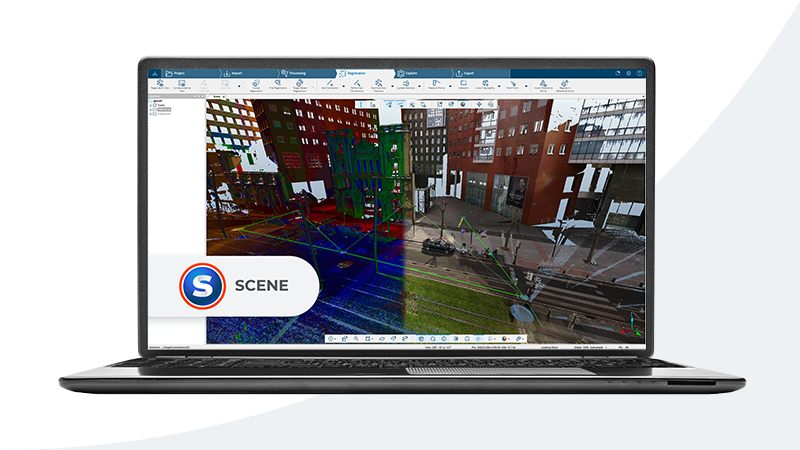
Tools doing this well include PointCab Origins (with its AI-assisted extraction), Leica CloudWorx, and several newer entrants like Scan2BIM AI and Reconstruct. The wall elements generated are geometrically correct in terms of position and extent, but they typically lack correct material assignment, fire rating, and other parametric properties.
Room Segmentation and Space Detection
AI can now automatically segment a point cloud into individual rooms and spaces with reasonable accuracy. CubiCasa, for example, uses machine learning trained on millions of floor plans to identify room boundaries and generate basic room layouts from 360-degree photographs and point cloud data. The output is a dimensionally approximate floor plan suitable for space planning and real estate applications.
For AEC purposes, room segmentation from full laser scans is more accurate. Modern tools can identify room boundaries, door openings, and window locations with approximately 70-85% reliability in standard building typologies (offices, residential, retail).
Clash Detection and QA
One of the strongest AI applications in the scan-to-BIM space is quality assurance — comparing a BIM model against the source point cloud to identify deviations. Verity by ClearEdge3D excels here, using machine learning to automatically detect where the BIM model deviates from the scanned reality, flagging misaligned elements, missing components, and dimensional discrepancies.
This is a fundamentally different task from generating the BIM model itself. It is verification, not creation. And it works well because the comparison is between two datasets that should match — finding differences is a well-defined problem that AI handles effectively.
Pipe and Cylinder Detection
For MEP (mechanical, electrical, plumbing) applications, AI tools can detect cylindrical objects in point clouds — pipes, ducts, conduits — and extract their center lines, diameters, and routing. Tools like PointCab, Trimble EdgeWise, and FARO As-Built handle this with increasing accuracy, particularly for exposed piping in industrial environments.
The limitation is that detection rates drop significantly for pipes that are insulated (round profile is obscured), bundled with other services, or running through tight spaces with poor scan coverage.
What AI Cannot Do Reliably (Yet)
Despite genuine progress, several critical aspects of scan-to-BIM conversion remain beyond reliable automation:
Complex MEP Modeling
While AI can detect cylindrical shapes, it cannot reliably identify what type of pipe, duct, or conduit it is looking at. A 4-inch pipe in a ceiling could be domestic water supply, fire suppression, waste, vent, natural gas, or compressed air. The material, system type, and connection logic determine how it is modeled in BIM — and these properties are not visually distinguishable from a point cloud alone.
Automatic MEP modeling at LOD 300 or above — where elements must be correctly identified by system type, material, and connection — remains a fundamentally human task. The modeler uses construction knowledge, building codes, and contextual clues (location, proximity to other systems, connection patterns) to make identifications that AI cannot.
Accurate LOD 300+ Modeling
LOD 300 (Level of Development 300) requires that BIM elements be modeled with specific systems identified, accurate dimensions, and correct relationships to adjacent elements. LOD 350 adds coordination interfaces. LOD 400 adds fabrication-level detail.
Current AI tools can produce output that approximates LOD 200 — basic geometry with approximate sizes and locations. Reaching LOD 300 reliably requires human judgment to:
- Correctly identify building systems (structural steel vs. architectural framing)
- Assign accurate material properties (concrete block vs. drywall vs. CMU)
- Model connections and interfaces between systems
- Handle non-standard construction (custom millwork, legacy building methods, field modifications)
No AI tool in 2026 can produce LOD 300+ output that passes professional QA review without significant human intervention.
Material Identification
A point cloud records the position and color of surfaces. It does not record what those surfaces are made of. AI can sometimes infer material types from color and texture patterns (red brick, white drywall, gray concrete), but this inference is unreliable for:
- Surfaces that are painted (any material can be any color)
- Concealed construction (the material behind a finished surface)
- Similar-looking materials (plaster vs. drywall, limestone vs. precast)
Correct material identification is essential for structural analysis, fire code compliance, acoustic design, and accurate cost estimation. Until AI can reliably determine material composition from visual data alone, this remains a human task.
Historic and Non-Standard Buildings
AI tools are trained on standard construction typologies — modern steel frame, concrete, and wood frame buildings with predictable geometries and system layouts. Historic buildings, industrial structures with custom equipment, and buildings with significant field modifications fall outside these training datasets.
When an AI tool encounters a hand-laid stone arch, a custom steel fabrication, or a 1940s-era MEP system with non-standard fittings, it either fails to classify the elements or misclassifies them as standard modern components. These buildings require experienced human modelers who understand historic construction methods and can interpret unusual geometry correctly.
Current AI-Assisted Tools: A Realistic Assessment
Here is an honest assessment of the leading AI-assisted scan-to-BIM tools as of early 2026:
| Tool | Strongest Capability | Realistic Automation Level | Best Application |
|---|---|---|---|
| CubiCasa | Floor plan generation from 360 photos | 80-90% for residential/simple commercial | Real estate, space planning |
| PointCab Origins | Point cloud to CAD/BIM extraction | 60-70% for architectural elements | Surveying, architectural documentation |
| Verity (ClearEdge3D) | BIM vs. reality comparison and QA | 85-95% for deviation detection | Construction verification, QA |
| Trimble EdgeWise | Pipe and structural steel extraction | 60-80% for exposed industrial MEP | Industrial plants, process facilities |
| Scan2BIM AI | Automated wall and floor detection | 50-70% for basic architectural | Residential and simple commercial |
| Reconstruct | Construction progress monitoring | 70-80% for progress tracking | Active construction sites |
The “automation level” percentages reflect how much of the BIM modeling work the tool can handle without human correction. Even at the high end, human review and correction is always required before the output is production-ready.
The Hybrid Workflow: What Actually Works
The most effective scan-to-BIM approach in 2026 is not fully manual or fully automated. It is a hybrid workflow that uses AI for what it does well and human expertise for what it does not.
Step 1: High-Quality Scan Data (Human + Hardware)
The foundation of any scan-to-BIM project — automated or manual — is accurate, complete point cloud data. AI cannot compensate for poor scan data. Gaps, registration errors, and noise in the source point cloud propagate through the entire pipeline, causing the AI tools to produce worse results.
This is where professional scanning with calibrated equipment matters most. The better the scan data, the better every downstream process performs — whether that process is AI-assisted or fully manual.
Step 2: AI-Assisted Element Detection (AI + Human Review)
Use AI tools to automatically detect and classify the elements they handle well: walls, floors, ceilings, doors, windows, and exposed piping. This typically handles 40-60% of the total modeling scope for a standard commercial building.
Step 3: Human Modeling for Complex Elements (Human)
A qualified BIM modeler completes the remaining 40-60% of the model: MEP system identification, material assignment, connection modeling, non-standard elements, and all LOD 300+ detail. The modeler also reviews and corrects the AI-generated elements, fixing misclassifications and adding missing properties.
Step 4: Automated QA (AI)
Use AI-powered tools like Verity to compare the completed BIM model against the source point cloud, flagging deviations for the human modeler to review. This is the step where AI adds the most value with the least risk.
The Result
This hybrid approach typically reduces total BIM modeling time by 20-40% compared to fully manual modeling, while maintaining the quality and accuracy that the project requires. The time savings come primarily from the automated initial geometry extraction, which gives the human modeler a head start rather than building every element from scratch.
Realistic Timeline for Full Automation
Based on the current trajectory of AI development in the AEC space, here is a realistic timeline:
- 2026-2027 — Continued improvement in basic architectural element detection. AI reliably handles LOD 200 for standard residential and simple commercial buildings. 30-50% time savings on standard projects
- 2028-2030 — AI achieves reliable LOD 200-250 for most building types. MEP detection improves for exposed systems. 40-60% time savings on standard projects. Complex buildings and LOD 300+ still require significant human input
- 2030-2035 — Potential for LOD 300 automation on standard building types with high-quality scan data. Material identification from multi-spectral scanning becomes viable. 60-80% time savings on standard projects
- 2035+ — Full LOD 300+ automation may become viable for standard construction, but historic buildings, complex industrial facilities, and unusual construction will likely require human expertise for the foreseeable future
These timelines assume continued investment in AI research for AEC applications and increasing availability of high-quality training data (paired point clouds and verified BIM models).
What This Means for Your Project Today
If you are commissioning a scan-to-BIM project in 2026, here is the practical advice:
-
Invest in high-quality scan data — This is the non-negotiable foundation regardless of whether AI or humans do the modeling. AI tools perform better with better input data, and human modelers work faster and more accurately with complete, clean point clouds
-
Ask your BIM provider about their AI toolset — The best BIM modeling firms are already using AI-assisted tools as part of their workflow. This should translate to faster turnaround and lower cost, not a marketing premium
-
Do not accept “AI-generated” BIM models without human QA — Any BIM deliverable should include documentation that a qualified human modeler reviewed and verified the output. AI-only output at LOD 300+ is not production-ready in 2026
-
Budget based on current hybrid workflows — Plan for BIM modeling costs that reflect 20-40% efficiency gains from AI assistance, but do not budget based on marketing promises of fully automated conversion
Frequently Asked Questions
Will AI eventually eliminate the need for human BIM modelers?
For standard, repetitive building types (tract housing, standard office buildings), AI will likely handle LOD 200-250 automation within the next 5-7 years, significantly reducing the need for human modeling at lower LOD levels. For complex projects, historic buildings, and LOD 300+ requirements, human expertise will remain essential for the foreseeable future. The role will likely evolve from “model everything from scratch” to “supervise and correct AI output.”
Does better scan data improve AI modeling results?
Significantly. AI scan-to-BIM tools are trained on clean, well-registered point clouds. When the input data has gaps, noise, registration errors, or low point density, the AI’s detection and classification accuracy drops sharply. Professional-grade scan data from calibrated equipment is not just better for human modelers — it is essential for AI tools to perform at their best.
Should I wait for AI to get better before commissioning a scan-to-BIM project?
No. If you need BIM data for a current project, the hybrid human+AI approach available today is mature, cost-effective, and produces reliable results. Waiting for full automation means working without accurate existing conditions data in the meantime, which creates risks that far exceed the cost difference between today’s hybrid approach and a hypothetical future automated approach.
How does THE FUTURE 3D support AI-assisted BIM workflows?
We deliver point cloud data that is optimized for both human and AI-assisted BIM modeling workflows. Our standard deliverables — clean, registered point clouds in E57, RCP, LAS, and OBJ formats — are the exact input that AI scan-to-BIM tools require. High-quality scan data is the foundation that makes every downstream process work better, whether that process uses AI, human expertise, or a hybrid of both.
Need BIM-conversion-ready scan data for your next project? Get a quote from THE FUTURE 3D, or explore our BIM scanning guide and Scan-to-BIM service to learn how we deliver the high-quality point cloud data that powers both human and AI-assisted BIM workflows.
Ready to Start Your Project?
Get a free quote and consultation from our 3D scanning experts.
Get Your Free Quote

